Category: LEADERSHIP

Leadership Articles prior to 2016

  • Thursday Quote: Good to Great Volunteers (Jim Collins)

    Have you ever felt like someone in leadership was just in the wrong place? Perhaps they seemed like they should be accomplishing much more than they are; or maybe you feel like they have more responsibility than they can practically handle. Welcome to the club. One of the greatest challenges we face as leaders is in getting the right people on the right seats on the bus.
     

    Today’s Thursday Quote comes from Jim Collins’ bestselling book, “Good to Great: Why Some Companies Make the Leap and Others Don’t“. Check out this chart found on page 20 in the book (which my book falls naturally open to from repeated references.)
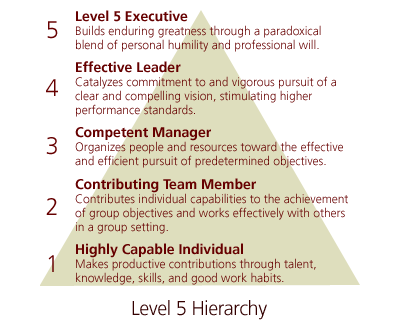
     

    Ironically, I would like to make a couple of practical inferences from this chart that are not really found in the book. Jim’s primary focus in this section of the book was related to the character and qualities of the leader(s) in the organization – specifically, the Level 5 Leader at the top (Two men I highly regard as emulating the Level 5 Qualities include Bill Hybels and Robert Morris. Click their names here to read more.)

    That said, let me unpack this for you two insights I’ve gained from this very meaningful chart.

    • First, nearly every committed member/participant in your church should fall in one of these various levels of contribution. I think it will be very helpful if you can discern which level your leaders and volunteers fall on this scale. For many of my leaders I can determine that they are on a level 2 or 3, and help motivate and resource them to grow into the next level of leadership.


    • However, what I have also discovered is that many people have a natural “lid” in the level of contribution that they can attain – and I need to be sensitive to that lid. My natural inclination is to try to move someone who is accomplishing great things for our church to the next level of leadership. However, it’s possible that, by doing so, I am setting that person up for failure, because my expectations don’t match their gifting and strengths. For instance, I had a secretary at our church who was a Highly Capable Individual – she was a serious work horse and accomplished a ton of stuff in small amounts of time. It’s possible that she could have moved to the next level, but that may not have been the best thing for her or for the church. So I needed to discern where she best fit, help her get there, and then find ways to encourage, resource, and strengthen her in that role.


    To learn more about this book or order it through my Amazon Affiliate’s bookstore, click this link.

    Disclosure of Material Connection: Some of the links in the post above are “affiliate links.” This means if you click on the link and purchase the item, I will receive an affiliate commission. Regardless, I only recommend products or services I use personally and believe will add value to my readers. I am disclosing this in accordance with the Federal Trade Commission’s 16 CFR, Part 255: “Guides Concerning the Use of Endorsements and Testimonials in Advertising.”
  • Tactical Tip: Saying Thank You Systematically

    Children know how to say the words ‘thank you’. Believe it or not, they even know when they are supposed to say them. But most parents know that expressing gratitude is not at the top of their list of things to do. Mom puts yet another meal on the table and rather than a ‘thank you’, the classic “eat your vegetables” battle ensues. Dad allows the kids to stay up late to watch a great movie and rather than a ‘thank you’, everyone just mosey’s on to bed when it’s over. Mom cleans up a messy bedroom and the child acts like he doesn’t even notice (he probably didn’t). That’s not to say that kids won’t say ‘thanks’ from time to time. No. Every once in a while it explodes from them like a burst of fresh sea air on a late afternoon day!

    We all know the importance and value of gratefulness. In fact, the Bible is full of verses exhorting us to thank God Himself in all things. Paul declares in 2 Timothy 3 that ungratefulness represents a quality of ‘terrible times in the last days’. Unfortunately, and like our children, expressing gratitude is often not at the top of our list of things to do!

    So in today’s Tactical Tip I am going to suggest a simple SYSTEM that will give gratitude a more prominent place in your regular routine. This system shouldn’t represent everything you do to thank your leaders and volunteers, but it’s probably more than you’re doing right now!

    The Thank You System
    To begin, you will need to collect a few resources. I suggest you add these to your shopping list right away or ask your spouse, secretary, or a volunteer to pick them up for you this week. Here’s what you will need: 

    • Four $40 gift cards.
    • A small notebook. 
    • Thirty stamped ‘Thank You’ cards.
    Now you are ready to begin. Follow these steps to setup your ‘Thank You System’. This should take you no more than 15 minutes to complete.
    • Place one gift card into four separate ‘Thank You’ cards and wrap a rubber band around them. Place a sticky note on the wrapped bundle that says “Gift Cards”.
    • Write at the top of the first page of the small notebook the words, “Thank You Log”.
    • Place the stack of ‘Thank You’ cards, the bundle of ‘Thank You’ cards including the gift cards, and the small notebook in a convenient location near, in or on the desk in your office.
    • Create a recurring reminder using your reminder system (if you don’t have a reminder system, then check out: Tactical Tip: Reminder Calendar) to send you a reminder every OTHER Monday morning at 9am or pick the day/time of your choice. I recommend a reminder no less than once every 14 days. Your reminder should say: “Write a Thank You card TODAY!”
    • Create another recurring reminder using your reminder system to send you a reminder once every 3 months to send a Thank You card with enclosed gift card. Your reminder should say: “Write and send a Thank You card with Gift Card TODAY!”
    • Create one last recurring reminder using your reminder system to send you a reminder once every YEAR beginning 11 months from now. Your reminder should say: “Evaluate and Setup your ‘Reminder Thank You’ system for this upcoming year.”
    You’re all finished! Your ‘Thank You’ Reminder System is now in place. Here is how the system will serve you:
    • When you receive your ‘Thank You’ reminder, STOP whatever you are doing or schedule a slot THAT DAY to follow up on this important task.
    • Stop and think of which leader or volunteer you want to encourage that week. Pull out your ‘Thank You Log’ and look down the list of names written there. Make sure you don’t pick someone you’ve already sent a card to, unless you specifically want to. Ensure you aren’t just thinking of the ‘obvious’ people all of the time.
    • Once you’ve decided on a person, write their name in the ‘Thank You Log’.
    • Write a heartfelt and meaningful ‘Thank You’, address and mail.
    Follow those same steps when you receive the quarterly ‘Thank You’ reminder including the gift card. When you receive the annual reminder, evaluate and revise your system as needed, shop for the next year’s ‘Thank You’ cards and gift cards and set them aside for when you run out of your current supplies. I suggest you use a different ‘Thank You’ card each year.
     
    If you decide to adopt this system or one like it, do me a favor – send me a ‘thank you’ via email at transformingleader@elimfellowship.org. I would love to know that this Tactical Tip has served you and your church! “Thanks!”
  • The Rhythm of Failure

    Craig Groeschel

    Do you remember when you learned how to ride a bike? How about your first few times trying to tread water? What can you learn today from that experience? Perhaps it’s time for you to go back to the basics all over again. You still remember how to ride a bike, but I wonder if you’ve forgotten how to learn how to ride a bike?

    This is my fear for many pastors and church leaders. They’ve forgotten about the rhythm of failure. Failure is critical if you want to learn to do anything new. There’s a rhythm within failure that equips and stimulates new ideas and growth.

    It goes something like this:

    • You try.
    • You fail.
    • You learn.
    • You adjust.

    This morning I watched this 10 minute clip from Craig Groeschel. I was encouraged. I needed to hear what he had to say about failure. Among other things, he shares four things we need to take risks and embrace failure in the church.

    I think you need to watch it too. Why not stop what you’re doing right now, put this on full screen, turn up the volume, and give yourself a quick leadership lesson. Perhaps you’ll want to forward this video on to the other leaders in your church as well. You won’t regret it.

  • Tactical Tip: Reminder Calendar

    Last Friday I received a text from my wife informing me that the inspection was overdue on our minivan. We decided a long time ago that things like vehicle inspections are my responsibility in the home. Oops. So I called the garage and got an appointment for Monday morning. I got a little chuckle from the auto mechanic as I left the garage. Evidently he sees a lot of ‘overdue’ stickers there!

    So I did what I should have done long ago, I added a reminder into my “Reminder Calendar”. I don’t think I’ll forget again.

    The Reminder Calendar is perhaps one of the coolest reminder systems I have ever stumbled across – and it’s super easy to setup and use. Even better, it’s free! This is not to be confused with the Appointment Calendar! I keep them totally separate because I don’t want to store all kinds of ‘reminder’ appointments on the calendar I look at every day for real appointments, like meetings and such. In fact, I never actually look at my Reminder Calendar!

    Let me define what I mean be a reminder calendar. Basically, it’s a calendar that is specifically designed to send you very timely emails or text messages.I use my Reminder Calendar to remind me to get up extra early in the morning for a breakfast appointment, change the oil in the car, take the garbage out, check the church website to make sure it’s relevant and up to date, and to remember when a task I assigned someone, or myself, is due. Here are a couple other examples to stimulate your thinking:

    • I asked someone if they would draft a proposal for me regarding our online streaming service. My goal was to be able to hear back from him no later than two weeks from that date. So I set myself up a reminder in my Reminder Calendar to shoot me an email in two weeks letting me know that I should have the proposal by now.
    • I wanted to find something out from a friend and discovered that he would be on vacation until August 13. So I set myself a reminder in my Reminder Calendar to give him a call around August 15.
    • My boss is on vacation and I will be leaving for a few days the day after he returns. I don’t want to forget to ask him an important budget related question before I leave. I created a reminder email for about 9am that morning.
    • My boss asked me to give him a call at 2pm while he was travelling on a certain day. I knew there was a chance I wouldn’t be at my desk and I didn’t want to forget to call him. I created a reminder that was setup to text me at 1:55pm so I would remember to make the call no matter where I was at.
    • I want to remember to begin planning for the Christmas Eve program no later than June of every year. I created a reminder appointment that will email me on June 1st to get the ball rolling.


    HERE’S HOW TO SETUP YOUR REMINDER CALENDAR:

    • Log into your Google Account.
      Log in to your Google account or create a Google Account for free. It’s important that you associate the account with the email address that you want to receive emails from.
    • Go to your Google Calendar.
      Once you’ve logged in, select “Calendar” from the top menu of options. This will take you to your calendar, specifically associated with that email address.
    • Create a NEW Calendar & label it as your Reminder Calendar.
      This option will allow you to keep your primary Google calendar as your appointment calendar. To create a new calendar, click the very small “Add” link in the “My Calendars” section to the left of your screen.
    • Enable Mobile Notifications
      Once you have created the calendar, click the “Settings” link right next to the “Add” link to take you to your Calendar Settings Screen. Next, click on the “Mobile Setup” tab. Follow the instructions on that screen to associate your cell phone with your Google Calendar. This will give you the option to receive text reminders from your calendar.
    • Set the Default Reminder Setting in Your ‘Reminder Calendar’
      You are almost finished. Now you should tell your reminder calendar what you want the default reminder mode to be every time you create a reminder appointment. I have mine set to email reminder. This way, all I have to do is create a reminder appointment and it will automatically email me for every appointment. I can still manually go in and disable the reminder or set it up to text me if I want to instead. To do this, click on the little drop-down arrow next to your Reminder Calendar and select “Calendar Settings”. Find the Notifications tab and click the “Add a reminder” link.
    • Start Creating Your Reminder Appointments!
      You are all ready to go! Now just create ‘appointments’ at the designated day and time that you want to receive your reminder. You can even create recurring reminders for every week, month, or year. To create your reminder simply highlight the appropriate day/time, type in the appointment and press ‘enter’. You just created a reminder appointment set to your default reminder method. To change the reminder method, add additional information, or set the reminder as recurring, double-click the appointment to open it in a new window for updating.

    Notes for Newbies:
    If you are new to Google Calendars then you may want to note a few of these details as well:
    • Make sure you have the right calendar selected.
      Since you have more than one calendar in your Google Account, you need to make sure you create your reminder appointment in the appropriate calendar. On the left of your screen, make sure that ONLY your Reminder Calendar is selected. You may also designate which calendar you want the reminder to be posted to in the appointment details.
    • Consider which reminder method you really want.
      There are three reminder options. Email, Text, and Popup. You probably won’t want to utilize popup unless you will always have your calendar open on your computer. You WILL want to make sure you designate which method you prefer for your reminders. You may also select BOTH if you want.
    • You can also use this same reminder system for your Appointment Calendar in Google. 
      OK. So you tend to be late for or forget meetings. Simply set a reminder for each of your appointments to send you a text 10 minutes before you’re supposed to prepare to arrive at the meeting.
    • Don’t give up.
      If you find yourself getting stuck, don’t get frustrated and give up. Like anything new, it may seem complicated at first, until you get the hang of it. Eventually, you’ll figure out how to make the system work and serve you the best.
  • Tactical Tip: Email Signature

    You would be very frustrated if someone left you a voice-mail and failed to tell you who they were or how to get hold of them. Example: “Hi pastor! This is Joe. I was wondering if you could give me a call about what we were talking about last Sunday. I have some ideas on that. Thanks! Bye.” OK. So I talked to someone named Joe about something last Sunday and he wants me to call him back. Hmm. I don’t remember that. Now what?

    The email signature is the digital version of the voice-mail signature. It’s your chance to let the world know exactly who you are and how they can get hold of you. It’s your business card.

    I am often amazed how few pastors and leaders leave a meaningful, relevant signature at the bottom of every email they send. Especially when it usually takes 5 minutes or less to set up! In the past month alone I have received emails from 3 pastors I totally respect and love working with, but who don’t have a helpful email signature. With two of them I had to do a Google search to find their website (and it took a while to find one of them) when a link at the bottom of the email would have sufficed.

    So today’s Tactical Tip is simply this . . . create a simple email signature at the bottom of all of your emails.

    Suggestions on a very basic email signature:
    The internet is full of suggestions on what a signature should look like. Ultimately, you want to give people the information they will need to contact you. Beyond that, you can personalize it all you want – but within reason.

    • Some people suggest starting with two dashes, like this >>   – –
    • Start with your first and last name (and title if appropriate).
    • Include your position if there are multiple people on-staff.
    • Include your church or organization name.
    • Include your church website. Some people suggest you actually type out the web address as well as create the link (in case someone isn’t able to click on the link, but wants to copy/paste or type the address in themselves.)
    • Include your phone number(s) of choice. This can be your personal cell number, home number, or office number. Whichever number you are most comfortable with the whole world knowing.
    • Optional: you may also opt to include the church or organization’s address. If it’s on your website this may not be necessary. It’s up to you.
    • Finally, you may want to include an inspirational, funny, or thought provoking quote.
    • NOTE: Many experts suggest that you keep your email signature to about five lines. Anything beyond that and it may look like you’re really lonely or just trying to write a book. Check out this site to view four common mistakes on email signatures.

    Example Signature:
    I rarely change my signature, but review it at least a couple of times a year. Here is my signature as of today’s date:

    Pastor Wayne Hedlund, Executive Pastor
    Elim Gospel Church
    1679 Dalton Road
    Lima, NY 14485
    (585) 624-5560

    Check out my blog at www.tranformingleader.org.

    How to Setup Your Signature:
    Now, I can’t exactly give you instructions since everyone has different email carriers. I have included links below to some helpful articles for the more popular email carriers. For the rest of you, I suspect the following will get you where you want to go: Open www.google.com and type the name of your email provider and the words “email signature”.

     
  • Thinking is Hard Work!

    How many times this month have you noticed some problem and didn’t try to find a solution? I bet it happens a lot more than you are willing to admit. You walk to your car and notice, again, how inadequate your parking lot is; or you are reminded during your Sunday service that the drums overpower all of the other instruments during worship. Perhaps you have a recurring problem with Sunday School volunteers showing up late; or you find yourself embarrassed to discover that your website is out of date again.

    This weekend I got to spend a day talking about strategic planning with some of the leaders at River of Life Fellowship in Copenhagen, NY. It was exciting to hear about the recent growth they have been experiencing as well as some of their future plans. Their unique mix of excellence and their commitment to the cause of Christ for their congregation and community were so refreshing.

    We ended our day brainstorming ideas on what they might improve or change in order to accommodate ongoing growth. They were full of some new and great ideas. I wouldn’t be surprised at all if they implemented some of those new thoughts within a few short days.

    That day reminded me how often we tend to let problems slide simply because a solution isn’t obvious or readily available. Usually, we simply don’t want to stop and really think things through until we find a solution.

    Thinking is hard work. I’m not talking about the kind of thinking we do every day to operate our vehicle on the way home from work. I’m talking about the kind of thinking we engage in when we have to complete a final exam, prepare a sermon, or learn something new. The energy and focus necessary for that level of thinking is taxing, which is why we shy away from it. I know I do. It’s a lot more satisfying to see a problem and find the solution without breaking into a sweat first!

    Last night I revisited some of my own past posts regarding critical and strategic thinking. It seemed appropriate to point them out to you this week as well.

    That’s why I’d like to introduce you to my new e-book:

    Thinking for a Change: a fresh look at critical thinking

    I’d love it if you would consider purchasing the book and letting me know what you think. You can learn more about this e-book right here or feel free to purchase it right now! Cost is only $3.99. Thanks!
  • How to Keep Missional Momentum

    A couple of weeks ago my son purchased a small dirt bike for $25 at a yard sale. We checked to make sure the engine worked before we made the purchase. What we didn’t check was to see if the clutch worked. Oops. It didn’t. Benjamin would open the throttle all the way and just barely move a few inches at a time. Thankfully, the owner took the bike back and returned our money!

    The same thing can happen in our churches and ministries when it comes to staying focused on our mission. We can get so caught up in everything else that we forget to keep mission, well, front and center. The next thing we know, we go for a ride and discover that we have very little missional momentum.

    Here are a few ideas to gain and keep missional momentum.

    • Create a Relevant Mission Statement
      I have several posts about why your mission statement is important and how to build one. You can check them out here.
    • Preach Your Mission
      You should do this often. You don’t need to title the message in the same way and it doesn’t have to be the same message, but you should preach the concepts of your mission regularly. If you don’t, well then I would suggest that perhaps you don’t really have buy-in to the mission of your church. 
    • Use Missional Language Whenever You Can
      Don’t get tired of hearing your mission statement. Include it in every possible conversation, both public and private. Use pieces of the mission statement as well as the whole thing. For instance, our mission statement at EGC includes the word “transforming”. That word is part of our language. Talk about fulfilling your mission when you give key announcements, receive the offering, during a message, during small group, and while counselling. If you haven’t used ‘missional language’ in the last week, then it’s very possible your starting to slip away from your missional focus.
    • Ensure EVERY Leader Knows the Churches Mission
      Any leader that doesn’t know your church mission is a leader who will not be pushing your mission, focusing on your mission, and building your mission into your church culture. Worse, there’s a much greater chance those leaders may slide in their focus, slowly drawing the ministry they lead away from what’s most important.
    • Connect Your Mission To Every Ministry of the Church
      Every ministry in your church should be clearly connected to the mission of your church. They should not have a separate mission statement. Ideally, the leaders will also preach the mission and use missional language whenever possible.
    • Connect Your Mission to Every Volunteer Position in the Church
      If you can’t explain how a volunteer position ultimately helps to fulfill the mission of your church, then you should re-evaluate that position and ministry. Ideally, your volunteers understand the connection as well. For example, perhaps you have a volunteer to lay and spread mulch outside every Spring. Does that volunteer understand that, by spreading this mulch, our community, guests and congregation will drive into the lot feeling welcomed and knowing this church cares about excellence. This (combined with a lot of other things) will motivate and inspire people to come and hear about Christ’s transforming love.
    • Put Your Mission in Print
      Your mission should be on your letterhead, website, in your bulletin, on the wall and anywhere else you can find a place for it to remind you and everyone else why your church is here (perhaps even a t-shirt).
    I’m sure there are more thing you can do to stay missional as a church. These will certainly help. Take two minutes right now and ask yourself how you are doing in each of these steps.

    Image compliments of hnfg at istockphoto.com

  • ..maybe you should do something scarier..


    I’m a fan of Seth Godin. His life message is about doing something new and different; getting out of the status quo; getting off the couch and making a lasting difference. Powerful and motivating. His message is to the world, not to Christians specifically. He can be blunt and painfully honest at times, but what he has to say is critical to our role as church leaders (not managers).

    In the church world I believe it is extremely important that we ask ourselves what we should be doing differently. What isn’t working? What new ideas should we tackle? How can we better facilitate the message of the Gospel? For instance, a while back I had an informal conversation with Pastor Joshua Finley and Pastor Seth Goodson at Elim Gospel Church about discipleship for the new believer. It was a refreshing conversation for me, simply because we were willing to stretch our thinking beyond what we’ve always seen and heard in the church world.

    Check out this 11 1/2 minute video interview with Seth and be challenged and inspired. Here are two quotes I jotted down while listening: “..maybe you should do something scarier..”, “.. mega-church is a factory..”.

    Exclusive interview with Seth Godin from GiANT Impact on Vimeo.

  • Character Driven or Emotion Driven

    Many years ago our church hosted a five minute radio show on a local radio station with our Senior Pastor at the time, Pastor Mike Cavanaugh, giving a short teaching.

    One day while out driving with my family, Pastor Mike came on the radio and shared the below comparisons between Character Driven People and Emotion Driven People. It impacted and challenged me so much that I wrote it out and for many years kept it posted on the wall in my office as a personal reference.

    I recently read Galatians 5:22-23 and this little teaching came back to my mind. I thought you might find it meaningful as well.


      Character Driven People
      Emotion Driven People
      Do right, then feel good
      Feel good, then do right.
      Are commitment driven.
      Are convenience driven.
      Make principle based decisions.   Make popularity based decisions.
      Action controls attitude.   Attitude controls action.
      Believe it, then see it.   See it, then believe it.
      Ask, “What are my responsibilities?”   Ask, “What are my rights?”
      Are steady.   Are moody.
      Continue when problems arise.   Quit when problems arise.

  • Teamwork and Trust

    I’m convinced that great teams are impossible to build and keep without trust. Trust is not something you can purchase, manufacture, or demand. It is a value that is modeled and built over time. You already know this . . . at least in your head, but do you understand what it takes to get there? I can give you a suggestion on where to begin. Patrick Lencioni’s book, “The Five Dysfunctions of a Team” and the associated field guide, “Overcoming the Five Dysfunctions of a Team“. If you lead any team at all, these books should be in your bookcase and on your mind.

    Consider this team of young men and what they have accomplished together. I can’t even begin to imagine the number of hours they spent together. It seems clear that there certainly is a high degree of trust – at least in relationship to this presentation! (Note: I recommend you watch in full screen.) Enjoy!

    Disclosure of Material Connection: Some of the links in the post above are “affiliate links.” This means if you click on the link and purchase the item, I will receive an affiliate commission. Regardless, I only recommend products or services I use personally and believe will add value to my readers. I am disclosing this in accordance with the Federal Trade Commission’s 16 CFR, Part 255: “Guides Concerning the Use of Endorsements and Testimonials in Advertising.”